


Qibla Compass: Al Quran
4.413.00 Reviews
App Specs
- Version
- 1.7.5
- Updated On
- License
- Free
- Downloads
- 1,000,000+
- Developer
- Radiant Islamic Apps
- Categories
- Libraries & Demo
- Platform
- Android
Screenshots
 Analysis by AppCompare
When I’m somewhere unfamiliar and need to work out which way to face for prayer, I want a clear answer without turning the moment into a navigation project. Qibla Compass: Al Quran is built around that need, pairing a direction-finding compass with other faith-related tools. I see its strongest use as a convenient starting point: open it, check your surroundings and phone, then use the displayed direction with care rather than treating any digital compass as infallible.
Who will get the most from it
This is most useful for someone who wants a Qibla tool close at hand while travelling, visiting a new neighbourhood or praying away from home. It may also suit a person who would rather keep a compass, Quran reading and prayer-time support together than switch among several apps. Radiant Islamic Apps makes it as a free app in the Libraries & Demo category, and its Everyone age rating makes it broadly accessible.
There are reasons to choose something else, too. If all you need is a direction and you already trust a dedicated compass, a separate Qibla app may feel simpler. If you need precise religious guidance for an unusual location or situation, I would use a trusted local source as well instead of relying on a phone reading alone. The app is a practical aid, not a substitute for checking that the phone is behaving sensibly.
Using the compass in the real world
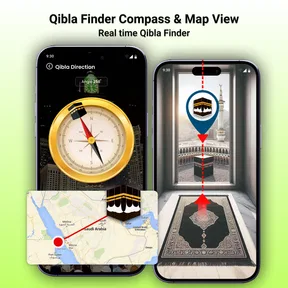
The useful workflow begins before I follow the arrow. I open the compass where I have enough room to hold the phone steadily, let it establish my location, and check that the displayed direction settles instead of jumping around. GPS helps identify where I am, while the phone’s built-in sensors supply the compass reading; those are different parts of the process, and a weak location fix or disturbed sensor can affect what I see.
From location to a usable direction
In a new hotel, for example, I would first step away from large metal objects and other things that might interfere with the phone’s compass. I would hold it flat, pause for the direction to stabilise, and compare the result with the room’s layout before choosing where to pray. That short routine is more dependable than glancing at a moving needle while walking or holding the phone at an awkward angle.
A practical tip is to avoid making a final decision in a hurry if the indicator seems uncertain. Move to a clearer spot, keep the phone level and check again. If the reading still looks inconsistent, restarting the app or consulting another compass is a sensible cross-check. A phone compass can be useful, but its result depends on the device and conditions around it; the word “accurate” should never mean that a user can skip basic checks.
This approach also helps when arriving somewhere with no obvious landmark or familiar street direction. Rather than trying to infer the Qibla from a map view, I can use the app’s location-based compass as a direct reference. Once I have settled on a direction, I can put the phone aside instead of keeping the screen open throughout prayer.
Worth Reading Before You Choose

Flipboard Shows What News Apps Must Do Beyond the Feed

Switching to Android Auto Means Rethinking Your Driving Routine

Google Calendar Makes a Crowded Week Easier to Manage

Ludo King Makes the Most of the Minutes Between Plans

Baby Panda World Brings Quick Play to Modern Phones, but Its Game Library Feels Busy

ESPN’s Live Game View Makes Following Close Games Easier
Making the other tools part of the routine
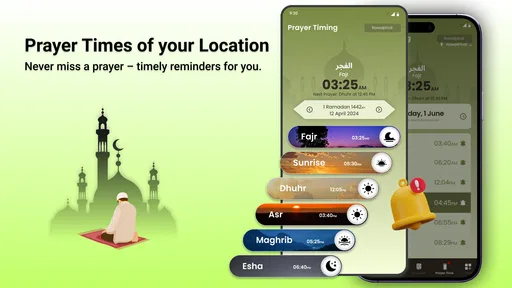
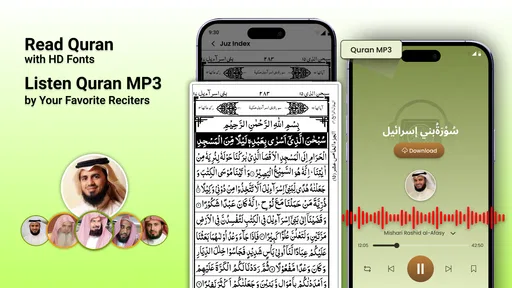
The app also includes a digital Quran and prayer-time support, so the compass is not its only possible stop in a daily routine. If I am away from my physical copy, having Quran text on the phone can be convenient. Prayer times and notifications can help me keep track of the day while handling work or travel, though I would check the displayed schedule against my usual local practice when setting up in a new place.
There is a small but useful distinction here: the compass answers a directional question, while prayer-time reminders help with timing. Neither replaces the other, and the reminders are most helpful when location settings and notification preferences are configured in a way that suits the user. I would check those settings before depending on alerts, especially if my phone often silences notifications or restricts background activity.
The handoff between the app and the physical setting matters too. I might use the compass to identify a direction, then orient a prayer mat or choose a clear space based on the room. In a shared room, I would make that decision discreetly and avoid leaving the phone on a surface where it can be bumped, since a changed position can make the compass display less useful.
What the extra options add—and what they do not
Theme choices offer a modest way to adjust the look, but I would treat them as a comfort feature rather than a reason to install the app. The central value is having the direction tool alongside reading and prayer-time functions. That combination can reduce app-switching, although it also means someone who wants a very minimal compass may find the broader set of tools unnecessary.
Compared with a standard compass app, this one is oriented around finding the Qibla rather than general navigation. Compared with relying on a map or asking someone nearby, it gives a private, phone-based way to check direction. Each alternative still has a place: maps are better for understanding streets and landmarks, while a trusted local person can help when a device reading is confusing or local practice calls for context.
Where the workflow can break
The main friction is not the idea of the app but the reliability of the phone’s inputs. Location access needs to work, and the compass sensor needs a reasonably clear environment. Indoors, near metal structures or when the phone is held unevenly, a reading may be less reassuring. I would not interpret a smoothly drawn interface as proof that the underlying direction is correct; checking the reading is part of using any phone compass responsibly.
There is also a trade-off between convenience and relying on one device for several needs. A phone with low battery, muted alerts or limited connectivity may not be the tool I want to depend on for every part of a routine. For a trip, it makes sense to check the direction before settling in and to keep a familiar backup approach in mind, especially if the location is remote or the phone’s compass behaves oddly.
The app is free to install, but it includes in-app purchases priced from $2.99 to $19.99 per item. I would start with the available free experience and only consider a purchase if a specific extra matters to me. The app has a 4.4 average from around 3,200 ratings, with over one million installs; those figures suggest it has reached many users, but they do not tell me whether it will suit every device or setting.
A sensible choice for everyday travel
Qibla Compass: Al Quran is currently at version 1.7.5 and requires Android 7.0 or later. Those details make it worth checking compatibility before installing on an older Android phone. If I were choosing for someone who regularly prays away from home and wants direction plus Quran and prayer-time tools in one place, I would put it on the shortlist. For a person who only needs a compass once in a while, the extra features may be more than necessary.
My overall view is that it is best used as a convenient, thoughtful helper rather than an unquestioned authority. Give the location and sensors a moment to settle, cross-check a strange reading, and use the Quran and reminders only if they fit your routine. With those expectations, it can make an unfamiliar place feel easier to navigate for prayer without making the process complicated.
Interface and first use
First things first: the interface. The app’s layout is clean and straightforward, which is always a plus in my book. When you open it, you're greeted with a simple compass that points in the right direction—literally. The compass is easy to read, and the app uses your phone’s GPS to pinpoint your location, ensuring accuracy.
On top of that, there are options to switch between different themes, which is a neat touch if you’re all about customization. The developers clearly put thought into making it not just functional, but also visually appealing.
More than a compass
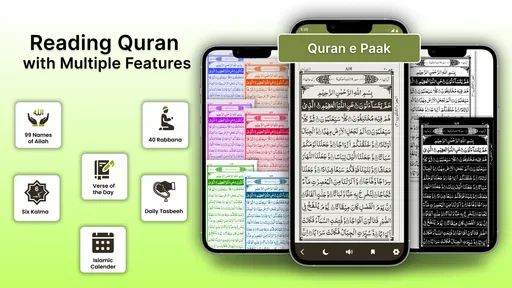
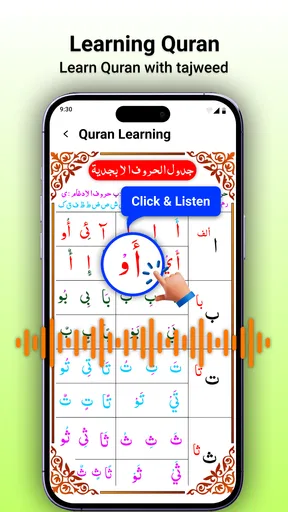
Now, let's talk about the extra goodies. Besides the main compass feature, the app includes a digital version of the Quran. This is particularly useful if you find yourself without a physical copy. You can read the Quran directly from the app, which is a great way to stay connected wherever you are.
Additionally, there’s a prayer time feature. This ensures you never miss a prayer, as it conveniently displays the prayer times based on your location. It even has notifications to remind you when it’s time to pray, which is super helpful for those who have a busy schedule.
Accuracy and performance
When it comes to apps like these, accuracy is key. Thankfully, Qibla Compass: Al Quran delivers on this front. It uses your phone’s built-in sensors to determine the direction of the Qibla, and based on my testing, it’s pretty spot-on. I even cross-referenced it with other compass apps, and it consistently pointed me in the right direction.
The performance is smooth, with no noticeable lags or crashes. It’s optimized to run efficiently without draining your battery, which is a big win in my book. After all, the last thing you want is an app that guzzles your battery life.
Why you might consider it
So, why should you download this app? Well, if you're someone who travels often or just wants a reliable tool for prayer times and direction, this app is a great companion. Its combination of simplicity, functionality, and additional features like the digital Quran and prayer time notifications make it stand out from the crowd.
Plus, it’s available for both Android and iOS, so no matter what kind of device you have, you’re covered. And did I mention it’s free? Yes, you heard that right. It’s a fantastic tool that doesn’t cost a dime, though there are in-app purchases if you want to unlock extra features.
In conclusion, Qibla Compass: Al Quran is a well-rounded app that does exactly what it promises, and then some. Whether you’re tech-savvy or just looking for a simple solution to keep up with your daily prayers, this app is worth checking out. So go ahead, give it a try, and never lose your way again!
Pros
- Accurate Qibla direction detection.
- User-friendly interface for easy navigation.
- Includes multiple Azan alarms.
- Comprehensive Quran reading options.
- Supports various languages for accessibility.
Cons
- Contains ads that can be intrusive.
- Limited customization for prayer times.
- Occasional bugs with location services.
- Some features require in-app purchases.
- Battery drain issues on prolonged use.
FAQs for Qibla Compass: Al Quran
What is the primary function of Qibla Compass: Al Quran?
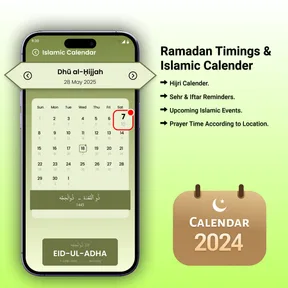
Qibla Compass: Al Quran is designed to help Muslims find the direction of the Qibla, which is essential for daily prayers. The app combines a compass feature for determining the direction with additional resources like Al Quran, prayer times, and Islamic calendar to assist users in their religious practices.
Does Qibla Compass: Al Quran require an internet connection to function?
The core feature, the Qibla compass, works offline by using your device’s GPS and sensors. However, some features such as downloading Quranic verses, accessing prayer times updates, or using the Islamic calendar may require an internet connection to ensure the most accurate and up-to-date information.
Is Qibla Compass: Al Quran user-friendly for beginners?
Yes, the app is designed with an intuitive interface that is easy to navigate, even for beginners. The compass is straightforward, with clear indicators for the Qibla direction. Additional features, such as bookmarks for Quranic verses and simple access to prayer times, are organized for ease of use.
Are there customization options available in Qibla Compass: Al Quran?
The app offers several customization options to enhance user experience. Users can choose from different compass designs, adjust the theme for readability, and set reminders for prayer times. This personalization ensures that the app caters to individual preferences and enhances overall usability.
How does Qibla Compass: Al Quran handle privacy concerns?
Qibla Compass: Al Quran respects user privacy by only collecting necessary data, such as location for the compass function. The app typically does not share personal information with third parties without consent. It is recommended to review the privacy policy for detailed information on data handling practices.


